Maven Bio vs ChatGPT (2026): Features and Use Cases Compared
Maven Bio provides live intelligence for biopharma decision-making. It monitors developments against team priorities and applies source-linked edits to selected files, keeping Word, Excel, and PowerPoint deliverables current 1.
ChatGPT supports conversation, research, analysis, and finished work across general topics. ChatGPT Work uses files and connected tools to create documents, spreadsheets, and presentations, run workflows, and update materials for review 2.
Maven Bio vs ChatGPT: Key Differences
Maven Bio provides live intelligence: it monitors developments against the team's assets and priorities, then applies source-linked edits to existing files with revision history and rollback. ChatGPT handles monitoring and file updates through instructed tasks, scheduled runs, or supported app events 13.
Research in Maven starts from a built-in biopharma database of drugs, trials, companies, deals, financing, and linked source documents. ChatGPT's biopharma research draws on web search, uploaded files, and connected tools 42.
Maven offers MCP, API, and connectors for its biopharma records and monitoring signals. ChatGPT uses plugins and custom MCP connections for external tools; full MCP support remains in beta 45.
Landscape research benchmark: Maven Bio vs ChatGPT
In October 2026, a Maven Bio benchmark evaluated five landscape research tasks, with three runs per tool for each task, scored against expert-curated answer keys. Every tool ran the same prompts in its own sandbox with web search, ClinicalTrials.gov, and PubMed access; ChatGPT Work used model 6.1-Sol. General tools could also write and run code and query APIs.
- Recall: 91% for the Maven Bio app vs 67% for ChatGPT Work.
- Found in all three runs: 84% for the Maven Bio app vs 62% for ChatGPT Work.
- 41 programs and deals found only with Maven tools.
| Landscape research task | Maven Bio app | ChatGPT Work |
|---|---|---|
| IgA nephropathy drugs at Phase 2 or later | 93% | 64% |
| Obesity and metabolic deals since 2023, $50M or more | 82% | 48% |
| Selective NaV1.7 and NaV1.8 pain inhibitors in the clinic | 94% | 67% |
| TL1A and IL-23p19 biologics in the clinic | 86% | 65% |
| KRAS G12D inhibitors and degraders in the clinic | 99% | 92% |
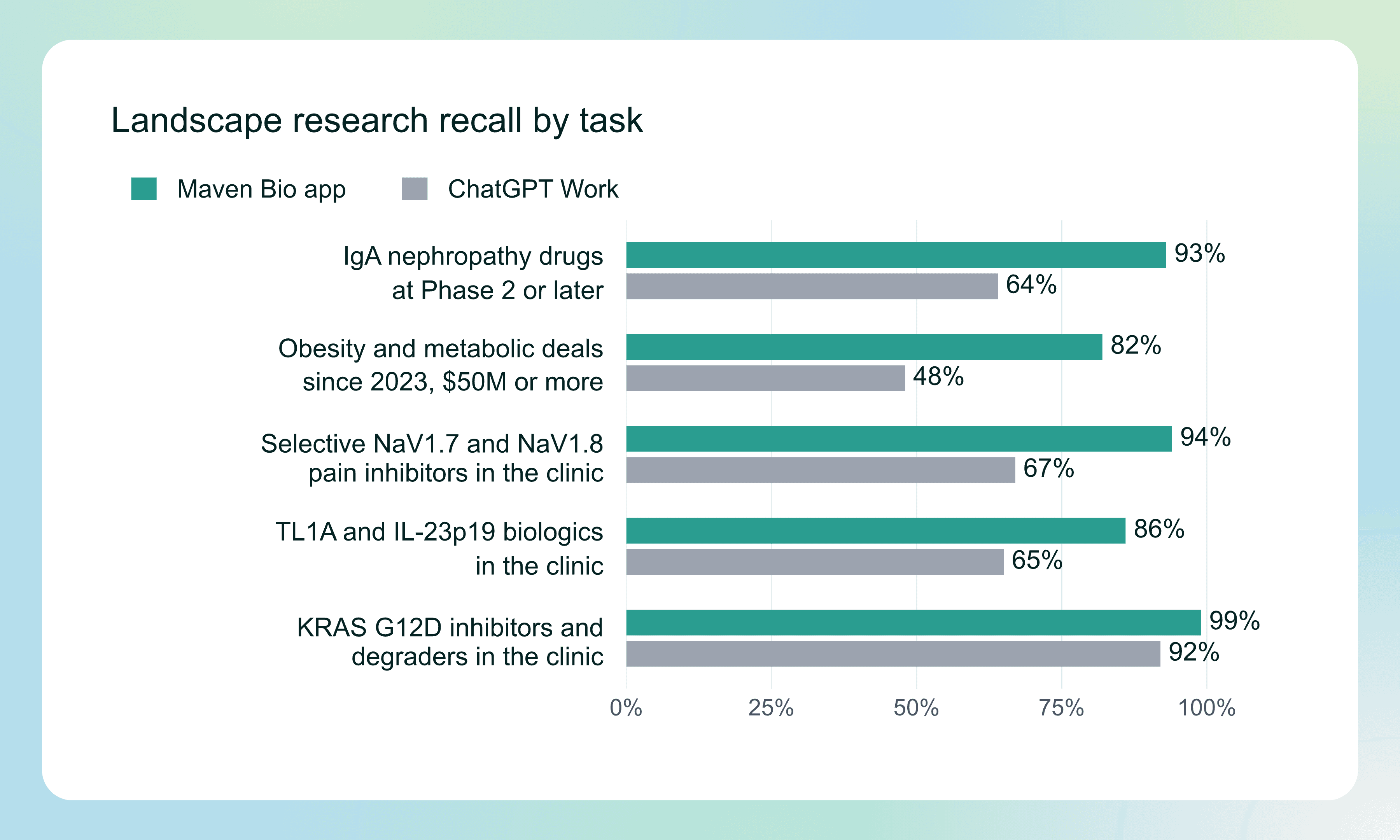
The largest gap was in deal research. Across runs, ChatGPT Work found 48% of qualifying obesity and metabolic deals since 2023, compared with 82% for the Maven Bio app.
Feature Comparison
ChatGPT's automations documentation describes scheduled and supported app-event tasks 3. Its research-evidence workflow describes prompted claim-review flags 6.
| Feature | Maven Bio | ChatGPT |
|---|---|---|
| Built-in biopharma database (drugs, trials, deals, financing) | Yes | Web and connected tools only |
| Monitoring against the team's assets and priorities | Yes | Scheduled or supported app-event tasks |
| Updates to existing files when evidence changes, with rollback | Yes | Task-directed only |
| Landscape recall (Maven Bio benchmark) | 91% | 67% |
| Found in all three runs (Maven Bio benchmark) | 84% | 62% |
| Evidence ratings on each answer | Yes | Prompted claim-review flags |
| Editable documents, spreadsheets, and presentations from uploaded material | Yes | Yes |
| Reusable instructions, scheduled workflows, and MCP connections | Yes | Yes |
| General work beyond biopharma | No | Yes |
Maven Bio
Best for: Biopharma teams producing candidate screens, evidence comparisons, and decision materials that need continuing updates. Maven combines linked research, team criteria, and editable deliverables within projects that retain the files and context for the next review 7.
Biopharma data built in
Research starts from connected drugs, trials, companies, deals, and financing linked to source documents. Teams can give compatible assistants this evidence through MCP or use the API to retrieve records and monitoring findings for their own systems 4.
Research you can defend
Define the candidates before researching the answer
Smart Tables gives the team a consistent basis for an asset or company screen. Filter by indication, mechanism, stage, and other structured fields, then ask the same research questions across the resulting candidates 8.
Keep the evidence beside the assessment
Teams can review why an answer supports their criterion and where a question remains unresolved. Each research cell exposes supporting quotes, evidence ratings, and research steps, helping reviewers distinguish a finding from its interpretation 8.
Compare supplied material in a Document Grid
Document Grids gives teams a table of AI-researched answers drawn from documents or Maven data, with the passages supporting those findings. Inputs include PDF and Office documents, text, audio and video, Maven search results, and an imported spreadsheet; teams can compare the same questions across the material 9.
Finished work in your team's format
Turn the research assignment into finished work
The Research Agent connects a biopharma assignment with the evidence and files needed to complete it. Teams can direct the investigation, review sources, and produce Word reports, Excel workbooks, and PowerPoint presentations in their own templates 7.
Organize a decision memo around its questions
Report Builder gives a research memo a defined structure before the writing begins. Teams set section-level questions, inspect the supporting evidence, and revise the resulting assessment instead of assembling a report from disconnected summaries 10.
Reuse the method for the next review
Workflows preserve a team's instructions, research criteria, and deliverable format. The same assignment can run on demand or on a schedule, using prior materials and connected context to produce the next review in the team's format 11.
Working files that stay current
Carry changing evidence into the working file
Maven monitors the developments relevant to a team's strategic questions and applies sourced revisions to selected files. Review controls, revision history, and rollback let the team inspect what changed before using the current version in a decision 1.
Connect the evidence to existing assistants
Teams can use Maven evidence in an assistant already involved in their research process. The MCP connector provides read-only access to linked records, source evidence, and monitoring signals; the API and webhooks support internal systems that need structured findings tied to their sources 4.
Maven Bio Pros
Maven Bio Cons
- Focused on biopharma research.
ChatGPT
Best for: Teams handling general research, drafting, analysis, and multi-step work across business functions 12.
Research and project context
ChatGPT can research questions, analyze materials, and use project files and instructions as context. Teams can refine the result through follow-up requests and use plugins to connect their work tools 12.
Documents and actions
ChatGPT Work creates and revises documents, spreadsheets, and presentations using source material and connected tools. On supported desktop setups, it can also work with local files, apps, and the browser 2.
Recurring work
Scheduled tasks can run on a schedule or from supported app events. Tasks can use plugins, skills, uploaded context, and connected tools to repeat a workflow 3.
ChatGPT Pros
ChatGPT Cons
- Full MCP support, including write actions, remains in beta 5.
- No built-in curated biopharma database; research relies on web and connected sources, with lower recall and consistency in the Maven Bio benchmark.